

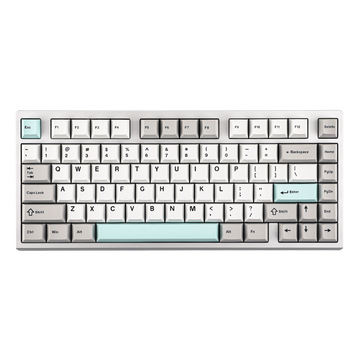


If you want a keyboard that feels comfortable to type on without creating much noise, you may have come across quiet membrane keyboards.
Membrane keyboards have been around for years, but modern designs can offer a more refined everyday typing experience with features such as wireless connectivity, RGB lighting, rechargeable batteries, and different layouts. For work, studying, everyday typing, or shared spaces, their quieter sound can be one of their biggest advantages.
But what exactly makes a membrane keyboard quiet? How does the membrane design affect typing feel? And why can two membrane keyboards sound different from each other?
Let's take a closer look.
What Is a Membrane Keyboard?
A membrane keyboard uses a flexible membrane layer beneath the keys to register keystrokes.
When you press a key, the key mechanism pushes down on the membrane and completes an electrical circuit, allowing the keyboard to recognize the input.
This is different from a mechanical keyboard, which uses individual mechanical switches underneath each key. Because the internal mechanisms are different, membrane keyboards typically produce a softer and more muted sound during normal typing.
The relatively simple construction of a membrane keyboard also allows manufacturers to produce a wide range of layouts and form factors, from compact keyboards to full-size models with dedicated number pads.
Why Are Membrane Keyboards Quiet?
The sound of a keyboard comes from more than just the mechanism underneath the key. Key movement, the keycap, internal construction, key travel, and the impact when a key reaches the bottom of its travel can all contribute to the final sound.
A membrane keyboard typically uses a softer actuation mechanism instead of an individual mechanical switch. This can reduce some of the sharper sounds associated with certain mechanical switches and create a more subdued typing sound.
The result is often a softer and less noticeable sound, which can be useful in environments where keyboard noise matters.
However, not every membrane keyboard sounds exactly the same.
The construction of the keyboard, keycap design, internal materials, key travel, and even the way you type can all change the final sound. The membrane mechanism is one part of the acoustic experience, not the only factor.
What Does a Quiet Membrane Keyboard Feel Like?
Sound is only one part of the typing experience.
Many membrane keyboards have a softer and more cushioned feel when a key is pressed. Instead of the more distinct switch response found on many mechanical keyboards, the keystroke can feel smoother and more gradual.
This can be appealing if you spend a large part of your day typing. Writing documents, answering emails, studying, browsing the web, or working with spreadsheets can involve thousands of repeated keystrokes, so a softer typing experience may feel more comfortable over time.
That said, the exact feel varies from one keyboard to another. The term "membrane" describes the underlying input technology, not one specific typing experience.
Are Quiet Membrane Keyboards Good for Work?
For many people, this is where a quiet membrane keyboard makes the most sense.
In an office, library, classroom, or shared workspace, keyboard noise can become noticeable over several hours of typing. A quieter keyboard can help reduce the amount of sound you create without requiring you to change the way you work.
Membrane keyboards are also available in familiar layouts that suit different types of work. A full-size keyboard with a dedicated number pad, for example, can be useful for spreadsheets, data entry, accounting, and other number-heavy tasks.
For users who prefer a complete layout, the MechLands M108 is a full-size membrane keyboard designed around a more traditional desktop layout.
If you want to keep a dedicated number pad while using less desk space, the MechLands M98 uses a more compact layout.
Are Quiet Membrane Keyboards Good for Gaming?
A quiet membrane keyboard can work well for gaming too, especially if you share a room or tend to play at night.
Gaming keyboards do not necessarily need to be loud to be enjoyable. A more subdued typing sound can make a gaming setup less distracting for people nearby while still providing the keys needed for everyday gameplay.
The right layout can also make a difference. A compact keyboard can leave more room for mouse movement, while a larger layout can be more convenient if you use the same keyboard for gaming, browsing, and productivity.
For a compact gaming setup, the MechLands Halo68 uses a 65% layout. For users who want more keys without moving all the way to a traditional full-size keyboard, the MechLands Halo98 offers a larger layout.
If you're also interested in reducing noise from other parts of your gaming setup, take a look at How to Choose the Right Quiet Keyboard for Everyday Typing, Working and Gaming.
Quiet Membrane Keyboard vs. Mechanical Keyboard
Membrane and mechanical keyboards use different technologies to register keystrokes, so they can provide different typing experiences.
A membrane keyboard uses a membrane layer beneath the keys, while a mechanical keyboard uses individual switches. This difference can affect the sound, key feel, construction, and customization options.
If your priority is a quieter and softer typing experience, a membrane keyboard can be a practical choice. If you prefer a more distinct switch response and the customization associated with mechanical keyboards, a mechanical keyboard may be a better fit.
Neither design is universally better. The right choice depends on how you type, where you use your keyboard, and what kind of experience you prefer.
Final Thoughts
A quiet membrane keyboard is not simply a keyboard that makes less noise. Its membrane mechanism, keycaps, internal construction, key travel, and your typing style all contribute to how it sounds and feels.
For office work, studying, shared spaces, and everyday computing, a quieter keyboard can make your setup feel more comfortable and less distracting.
Understanding how membrane keyboards work can also help you look beyond the simple "quiet" label. Different designs can have noticeably different typing feels and acoustic characteristics, even when they use the same basic membrane technology.
If you want to explore different membrane keyboard layouts and designs, visit the MechLands Membrane Keyboard collection.


