



With so many keyboards available today, choosing the right one is not simply about finding the model with the longest feature list. Layout, switch technology, connectivity, and the way a keyboard handles input can all make a noticeable difference depending on how you use it.
That's the idea behind MechLands Picks—a space where we take a closer look at keyboards and desk gear worth discovering, while explaining what makes each product different in everyday use.
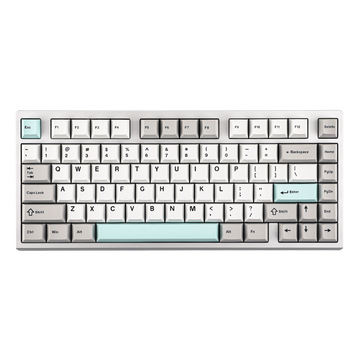
For our first picks, we're looking at two keyboards built around very different priorities: the EPOMAKER TH108 V2 Pro and the EPOMAKER HE80. One keeps the familiar 100% layout and focuses on versatility, while the other uses Hall Effect magnetic switches for more configurable gaming input.
EPOMAKER TH108 V2 Pro: When a Full-Size Keyboard Still Makes Sense

Compact keyboards are convenient, but they are not automatically better for every workflow. The EPOMAKER TH108 V2 Pro takes the opposite approach with a 100% layout and 104 keys, including a dedicated number pad, function row, navigation keys, and arrow keys.
If you work with spreadsheets, numbers, documents, or other productivity tools, having those keys in their familiar positions can be more convenient than relying on shortcuts. The trade-off is simple: you give up some desk space in exchange for a complete layout.
More Than a Traditional Full-Size Keyboard
The TH108 V2 Pro adds a screen and rotary knob to that familiar layout. The screen can display keyboard information and customized visual content, while the knob provides quick access to functions such as volume and screen control.
It also supports USB-C, 2.4GHz wireless, and Bluetooth, making it practical for users who switch between a desktop, laptop, and other compatible devices. A 10,000mAh battery further supports longer wireless use.
What About the Typing Experience?
Underneath the full-size layout is a gasket-mounted structure with multiple acoustic layers. Instead of producing a rigid, direct typing feel, the internal construction is designed to provide more cushioning and help control case resonance.
Combined with factory-lubed mechanical switches, the result is a keyboard that puts equal emphasis on everyday typing and the physical feel of the board. It also supports hot-swappable 5-pin mechanical switches, giving users the option to change the switch feel later.
Explore the EPOMAKER TH108 V2 Pro →
EPOMAKER HE80: What Makes a Hall Effect Keyboard Different?

The EPOMAKER HE80 takes a different approach to keyboard input. Its Hall Effect magnetic switches detect key position rather than relying on the traditional physical contact mechanism found in conventional mechanical switches.
Why does that matter? Because the keyboard can detect the movement of a key throughout its travel. This allows features such as adjustable actuation and Rapid Trigger that are difficult to achieve with a conventional mechanical switch.
Adjustable Actuation and Rapid Trigger
The HE80 lets you adjust the actuation point from 0.1mm to 3.3mm in 0.02mm increments. In practical terms, you can decide how far a key needs to move before an input is registered.
It also supports Rapid Trigger, which responds to the movement of a key as it is pressed and released rather than relying on a fixed reset point. For games with frequent movement inputs, this gives users more control over how quickly a key can activate and deactivate.
The important distinction is that these features do not make someone automatically faster at a game. They give the player more control over the behavior of the keyboard.
Built for Fast Gaming Input
The HE80 combines its magnetic switches with an 8K polling rate and 32K scan rate. It also supports SOCD and DKS, allowing users to configure how certain key combinations and different points of key travel are handled.
Its 75% layout with 82 keys keeps the board compact while retaining dedicated arrow and function keys. That leaves more room for mouse movement than a full-size keyboard, which can be useful for gaming setups.
The browser-based EPOMAKER driver handles these settings without requiring a separate software installation, so users can adjust actuation, Rapid Trigger, DKS, SOCD, macros, and RGB settings directly from the web interface.
Two Keyboards, Two Different Priorities
The TH108 V2 Pro and HE80 are built around different ideas of what a keyboard should do.
The TH108 V2 Pro is about having everything available in one keyboard: a complete 100% layout, dedicated number pad, multiple connection modes, screen and knob controls, and a more cushioned gasket-mounted typing experience.
The HE80 is more focused on input behavior. Its Hall Effect switches allow adjustable actuation and Rapid Trigger, while features such as DKS, SOCD, 8K polling, and a compact 75% layout are aimed at gaming-focused setups.
So when comparing the two, the useful question is not which keyboard has more features. It is which approach fits your desk and the way you actually use a keyboard.
What to Look for When Choosing a Keyboard
Start with the layout. If you regularly use a number pad, a 100% keyboard can save you from working around a compact layout. If desk space and mouse movement are more important, a 75% keyboard can leave more room without giving up the function row and arrow keys.
Then consider the switch technology. Mechanical switches offer a familiar physical typing experience and broad switch compatibility, while Hall Effect switches enable more precise control over actuation and key release.
Finally, think about the features that actually affect your daily use. Wireless connectivity, a screen and knob, typing feel, adjustable actuation, or gaming-focused input functions can all be useful—but only if they match what you need from the keyboard.
That is what MechLands Picks is about: exploring different keyboards, technologies, and design ideas from a practical user perspective. Rather than simply listing products, we look at what makes each keyboard different and who might find those differences useful.
Whether you're researching keyboard recommendations, exploring a Hall Effect gaming keyboard, or looking for a full-size keyboard for work, stay tuned for more keyboard discoveries from MechLands.


