


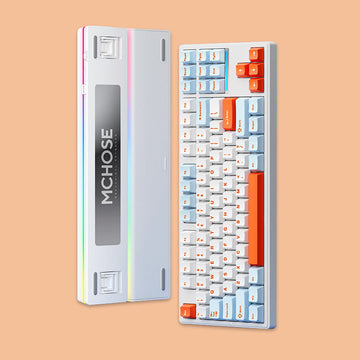


A 75% mechanical keyboard is one of the easiest layouts to recommend — and one of the hardest to choose.
The layout keeps the keys most people use every day while taking up less desk space. But once you start comparing models, the differences become less obvious. Gasket mounts, acoustic foam, wireless connectivity, Hall Effect switches, Rapid Trigger, TFT screens, and rotary knobs now appear across countless keyboards, making many models look similar at first glance.
The better question is not which 75% keyboard has the most features, but which features will actually make a difference to the way you use it?
From typing feel and sound to gaming response and desk setup, different 75% keyboards are built around different priorities. These four examples show how the same compact layout can be approached in very different ways.
EPOMAKER x AULA F75: Start With the Typing Experience
For many mechanical keyboard users, the most important part of a keyboard is still the simplest: how it feels and sounds when you type.
The EPOMAKER x AULA F75 takes an acoustic-focused approach. Its internal design uses five layers of damping materials, including PORON, IXPE, PET, and silicone, to help control resonance and shape the overall typing sound. Combined with a gasket-mounted structure, the result is a keyboard designed around a softer and more refined typing experience.
Beyond acoustics, the F75 offers a hot-swappable PCB, 4,000mAh battery, and tri-mode connectivity, giving it the flexibility to work across different everyday setups.
That makes the F75 worth exploring if you spend hours typing and care about the character of your keyboard rather than simply checking off a list of specifications.
If phrases such as deep, thocky, marbly, or soft typing feel are what catch your attention when browsing keyboard reviews, this is the kind of 75% keyboard where the typing experience deserves a closer look.

EPOMAKER HE75 V2: When 75% Meets Hall Effect
A Hall Effect keyboard changes the conversation completely.
Instead of relying on traditional mechanical switch contacts, the EPOMAKER HE75 V2 uses magnetic Hall Effect technology to provide highly adjustable key response. Its gaming-oriented feature set includes Rapid Trigger, adjustable actuation, SOCD, DKS, and high polling performance, giving users more control over how individual keys respond.
The important part is not simply the numbers. These features are designed for users who want to fine-tune input behavior, particularly in games where rapid movement, repeated key presses, and quick directional changes can make adjustable response useful.
The HE75 V2 shows that a 75% mechanical keyboard does not have to be built primarily around traditional typing. The same compact layout can instead be designed around speed, adjustability, and input control.
For someone looking specifically for a Hall Effect 75% keyboard or a compact gaming keyboard with Rapid Trigger, these capabilities may matter more than acoustic tuning or additional desk-oriented features.

MechLands Vibe75 V2: Make the Keyboard Part of Your Desk
Some users care most about sound and feel. Others want a keyboard that feels like part of their personal setup.
The MechLands Vibe75 V2 takes a more visual and everyday-use approach. Its 79-key 75% layout includes a customizable TFT screen that can display information such as battery status, time, and connection mode, with support for GIF animations.
Its hardware also combines gasket mounting, a flex-cut PC plate, five layers of internal padding, hot-swap support, south-facing RGB, and wired, 2.4GHz, and Bluetooth connectivity. Together, these features give the Vibe75 V2 a balance between typing experience, everyday usability, and visual customization.
The screen is not simply another item on the specification sheet. It changes how the keyboard looks on a desk and gives users another way to personalize their setup.
That makes the Vibe75 V2 particularly interesting if your keyboard is more than an input device. If you enjoy building a cohesive desk setup, matching colors, choosing keycaps, and arranging your peripherals, visual details can be just as important as switch specifications.

AJAZZ AK820 Pro: More Features in a Familiar Format
The AJAZZ AK820 Pro takes another route. It combines the familiar 75% layout with an interactive TFT screen and control knob, while also offering gasket mounting, a flex-cut PC plate and PCB, 4,000mAh battery capacity, and tri-mode connectivity.
The TFT display can provide visual information such as time, battery status, operating system, and connectivity, while also supporting customized visuals. Meanwhile, the control knob adds a convenient physical control for functions such as volume and media adjustment.
This makes the AK820 Pro a good example of how modern 75% keyboards have moved beyond the traditional mechanical keyboard formula. You still get the compact layout, but the keyboard also becomes a small interface that provides information and additional controls.
If you like having more visual feedback and physical controls without moving to a larger keyboard, the AK820 Pro offers another way to approach the 75% format.

75% Mechanical Keyboard Comparison
Choosing a 75% mechanical keyboard is about finding the right balance between layout, typing experience, gaming performance, and everyday usability. Compare these four keyboards below to see how their key features differ and which specifications matter most for your setup.
| Feature |

|

|

|

|
Switch Technology | Mechanical Linear Switch | Hall Effect Magnetic Switch | Mechanical Hot-swappable Switch | Mechanical Hot-swappable Switch |
|---|---|---|---|---|
| Mount Structure | Gasket Mount | Gasket Mount | Gasket Mount | Gasket Mount |
| Connectivity | Bluetooth 2.4GHz Wired |
Bluetooth 2.4GHz Wired |
Bluetooth 2.4GHz Wired |
Bluetooth 2.4GHz Wired |
| Battery | 4000mAh | 8000mAh | 4000mAh | 4000mAh |
| Hot-swappable | Yes | Yes Magnetic Switch Compatible |
Yes | Yes |
| Sound Design | 5-layer Acoustic Dampening | Gaming-focused Structure | 5-layer Padding Flex-cut PC Plate |
Flex-cut Plate Design |
| Gaming Features | Standard Mechanical Input | Rapid Trigger SOCD DKS 8000Hz Polling Rate |
Standard Mechanical Input | Standard Mechanical Input |
| Display | No | No | Customizable TFT Screen | TFT Screen |
| Rotary Knob | Yes | Yes | No | Yes |
| RGB | RGB Backlight | RGB Backlight | South-facing RGB | RGB Backlight |
| Best Match | Typing, office work, and sound enthusiasts | Competitive gaming and fast-response users | Desk setup builders and customization lovers | Users who want extra controls and visual feedback |
Find Your 75% Keyboard
There is no single way to build a 75% mechanical keyboard, and that is exactly what makes the format worth exploring.
The AULA F75 focuses on acoustic tuning and typing feel. The EPOMAKER HE75 V2 brings Hall Effect technology and adjustable gaming response into the layout. The MechLands Vibe75 V2 adds personalization through its customizable display and desk-focused design, while the AJAZZ AK820 Pro combines an interactive screen and control knob with a flexible wireless setup.
They all start with the same basic idea — keep the useful keys, remove unnecessary bulk — but take the experience in different directions.
If you are still exploring the format, browse the full 75% keyboard collection at MechLands. Start with the feature that matters most to you, whether that is typing sound, gaming response, desk customization, or physical controls.
A keyboard is something you interact with every day, so choosing one is often less about finding the longest specification list and more about understanding which features will actually become part of your daily experience.
